Cart
0
The Ultimate Guide to Indoor Motion Sensor Lighting: Convenience, Safety, and Energy Efficiency
Discover how indoor motion sensor lighting can transform your home by adding convenience, enhancing safety, and reducing energy consumption. This comprehensive guide explains everything from sensor types to installation tips, helping you make an informed upgrade.
Key Takeaways
- Indoor motion sensor lights detect movement to automatically illuminate spaces, improving convenience and security.
- Common sensor types include Passive Infrared (PIR), Ultrasonic, and Dual Technology sensors, each with distinct benefits.
- These lights increase safety by preventing accidents, deter intruders, and contribute significantly to energy savings.
- Various products exist, from sensor night lights and bulbs to LED strip lights and spotlights, suited for different needs.
- Smart home integration enhances automation and control, while user features like manual override and sensitivity adjustment offer customization.
Table of Contents
- 1. Understanding Indoor Motion Sensor Lights
- 2. Various Types of Indoor Motion Sensors
- 3. The Benefits of Indoor Motion Sensor Lighting
- 4. Assorted Varieties of Indoor Motion Sensor Lights
- 5. Considerations for Installation and Power Source
- 6. Considering the Impact of Brightness and Color Temperature
- 7. Enabling Smart Home Integration and Automation
- 8. Applications and Preferred Locations for Indoor Motion Sensor Lights
- 9. Battery Life and Maintenance Tips
- 10. User Control Features: Manual Override and Sensitivity Adjustment
- 11. Prowess of the Market for Motion Battery-Operated Lights
- 12. Consumer Testing and Expert Recommendations
1. Understanding Indoor Motion Sensor Lights
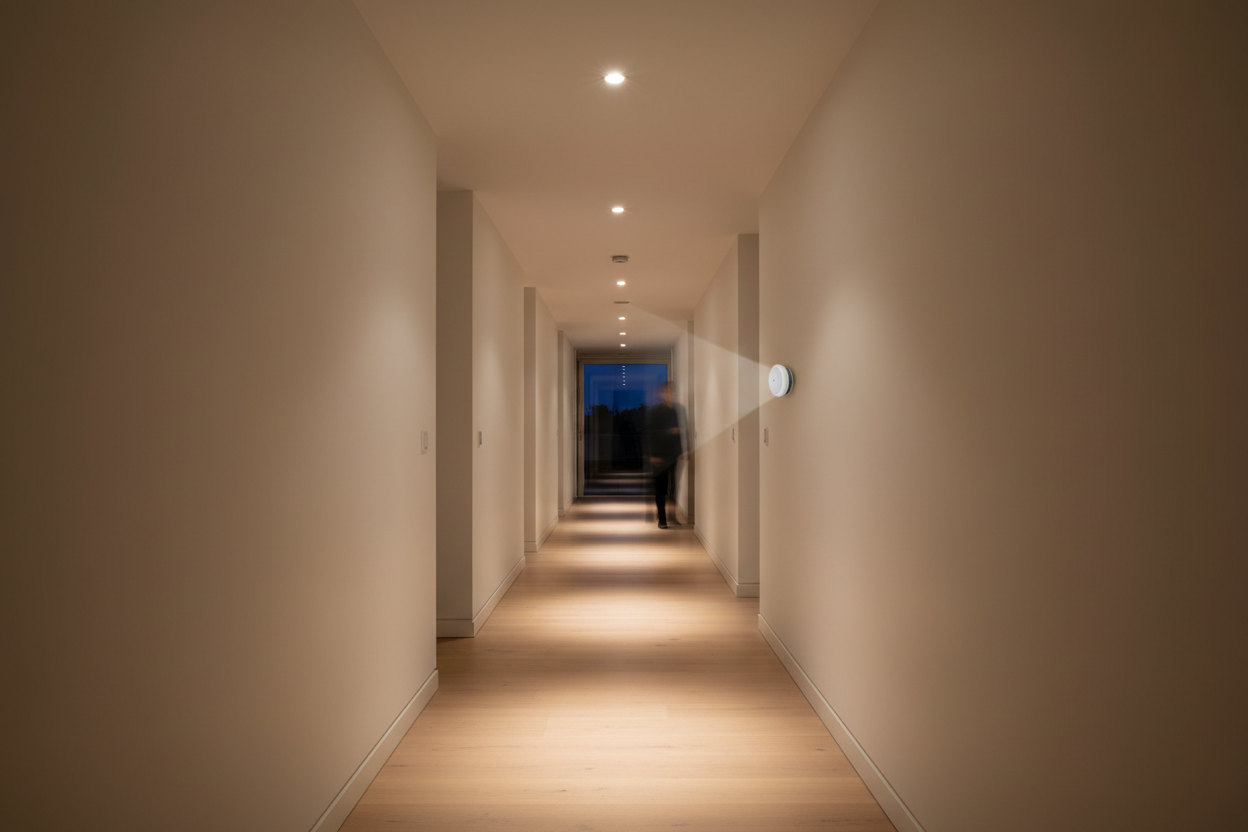
Indoor motion sensor lights are fixtures equipped with sensors that detect movement within a certain range and automatically turn on the light. Once motion stops, the light switches off after a preset delay. This hands-free operation ensures illumination only when needed, enhancing both ease and security.
They are perfect for indoor areas such as closets, staircases, hallways, bathrooms, and entryways — places where instant light is often essential without fumbling for switches.
2. Various Types of Indoor Motion Sensors
Selecting the right sensor depends on the environment and your specific lighting needs. The main sensor types are:
Passive Infrared (PIR) Sensors
- Detects infrared radiation from warm bodies such as humans and pets.
- Range: 3 to 6 meters (10 to 20 feet).
- Pros: Accurate, energy-efficient, affordable.
- Cons: May not detect still individuals or if obstacles block radiation.
Ultrasonic Sensors
- Use sound waves to detect motion, effective even through obstacles.
- Range: Up to 9 meters (around 30 feet).
- Pros: Wide coverage, works in varied conditions.
- Cons: Can generate false alarms from vibrations or air currents.
Dual Technology Sensors (PIR + Ultrasonic)
- Combine PIR and ultrasonic sensors to improve detection accuracy.
- Lights activate only when both sensors agree motion is present.
- Pros: Reduces false triggers, enhances reliability.
- Cons: Typically more costly than single sensor types.
3. The Benefits of Indoor Motion Sensor Lighting
Convenience and Hands-Free Operation
- Automatically illuminates rooms, closets, and corridors as you enter.
- Eliminates fumbling for switches, especially when hands are full.
- Supports accessibility for children, seniors, and people with mobility restrictions.
Enhanced Safety and Accessibility
- Lights pathways and stairways to reduce trip-and-fall incidents at night.
- Improves visibility in tricky spaces, benefiting seniors and visually impaired people.
- Deters intruders by illuminating entry points automatically.
Energy Efficiency and Cost Savings
- Operates only when motion is detected, avoiding wasted electricity.
- Energy usage in low-traffic areas can decrease by 30–60% with sensor lights.
- Battery-powered models offer extended life and require minimal standby power.
Smart Home Integration
- Works with voice assistants like Amazon Alexa, Google Assistant, and Apple HomeKit.
- Enables remote control and customized automation (e.g., motion at sunset triggers lights).
- Offers adjustable settings for sensitivity, brightness, and timeouts tailored to your lifestyle.
User-Friendly Features
- Manual override allows the lights to stay on as needed.
- Sensitivity adjustments help avoid false alarms or missed activation.
- Low battery indicators provide timely alerts for replacements or recharging.
4. Assorted Varieties of Indoor Motion Sensor Lights
Motion sensor lighting comes in diverse forms to suit different indoor needs:
- Motion Sensor Night Lights: Compact plug-in or battery-powered lights offering subtle illumination in bedrooms and hallways.
- Sensor Light Bulbs: Direct replacement bulbs with integrated motion sensors for effortless smart lighting upgrades.
- LED Strip Lights with Motion Sensors: Flexible, adhesive strips ideal for cabinets, stairs, or closets with customizable lengths.
- Motion Sensor Spotlights: Focused lighting options useful for accent or security purposes, available in wired or rechargeable models.
- Battery-Operated Motion Sensor Lights: Portable, wireless units great for closets, bathrooms, or temporary setups without wiring hassles.
Choosing the right variety depends on space size, power source, installation preferences, and desired brightness.
5. Considerations for Installation and Power Source
Power Source Options
| Power Type | Advantages | Considerations |
|---|---|---|
| Battery-Operated | Easy to install; portable; no wiring needed | Requires regular battery replacement |
| Rechargeable | Eco-friendly; cost-effective over time | Needs periodic recharging |
| Hardwired | Reliable; permanent solution | Requires professional installation |
| Plug-In (Electric) | Continuous power; easy to relocate | Potential tripping hazard; less flexible placement |
Tips for Sensor Placement
- Mount sensors at 5 to 7 feet high for optimal detection of human movement.
- Face the sensor toward main walking paths, avoiding obstructions like furniture or walls.
- Check sensor coverage angle (usually 90°–120°) to ensure it fits the space layout.
- Avoid placement near heat sources, air vents, or windows to reduce false triggers.
6. Considering the Impact of Brightness and Color Temperature
The quality of light emitted affects safety and comfort:
- Brightness is measured in lux and should be tailored to area function (e.g., low for bedrooms, higher for stairs).
- Cool white lights (5,000–6,500 Kelvin) typically provide better visibility and are appropriate for functional zones like closets and hallways.
- Warm white tones (2,700–3,000 Kelvin) create a cozy ambiance, best for bedrooms or relaxation spaces.
- Adjustable brightness and color temperature offer the flexibility to adapt lighting to different times and activities.
7. Enabling Smart Home Integration and Automation
Smart-enabled motion sensor lights elevate convenience with advanced controls:
- Compatible with Amazon Alexa, Google Assistant, and Apple HomeKit for hands-free voice control.
- Supports scenarios such as turning on lights automatically when you arrive home after dark.
- Can adjust brightness based on ambient light or activate alarms when motion is detected outdoors.
8. Applications and Preferred Locations for Indoor Motion Sensor Lights
- Closets and Cabinets: Activate lights upon opening doors, eliminating dark fumbling.
- Bathrooms: Provides gentle illumination at night without harsh overhead lights.
- Hallways and Staircases: Enhances safety by lighting walking routes during nighttime.
- Entrances and Mudrooms: Lights up immediately when entering with hands full.
- Laundry Rooms and Basements: Illuminates darker areas only when used.
- Nurseries and Children’s Bedrooms: Offers safe night lighting that responds to movement.
9. Battery Life and Maintenance Tips
- Battery life ranges from several months to a year, depending on frequency and battery type.
- Choose models with low-battery indicators for timely replacements or recharging.
- Rechargeable lights can reduce ongoing costs and environmental impact.
- Use manufacturer-recommended batteries to ensure optimal performance.
- Keep sensor lenses clean for sensitive detection and proper light output.
10. User Control Features: Manual Override and Sensitivity Adjustment
- Manual Override: Lets you keep lights on continuously when motion activation isn’t suitable.
- Sensitivity Adjustment: Enables fine-tuning sensor responsiveness to prevent false or missed activations.
These features provide adaptability based on individual preferences and use-case scenarios.
11. Prowess of the Market for Motion Battery-Operated Lights
Wireless, battery-powered motion sensor lights have surged in popularity for their portability and ease of installation:
- Quick, wire-free installation with adhesives, magnets, or mounts.
- Adjustable brightness and sensor range enhance flexibility.
- Ideal for renters, temporary use, or spaces without available power outlets.
- Well-known brands offer reliable options for indoor as well as sheltered outdoor areas.
12. Consumer Testing and Expert Recommendations
"Sensor placement and orientation greatly impact activation efficiency—motion moving across the detection zone triggers lights more reliably than direct frontal movement."
- Cool white lighting improves visibility and perceived safety.
- Adhesive mounts reduce trip hazards in narrow areas compared to plug-in units.
- Manual override is highly valued for customized lighting control.
- Adjust brightness and sensitivity according to room size and activity patterns.
Incorporating these insights supports selecting the best indoor motion sensor lighting to meet your home's unique needs.
Ready to upgrade? Explore a wide range of motion sensor lighting solutions tailored for enhanced home safety and convenience.
FAQ
How do motion sensor lights save energy?
They activate only when motion is detected, eliminating unnecessary lighting and thus reducing power consumption significantly compared to lights left on continuously.
What sensor type is best for indoor use?
Passive Infrared (PIR) sensors are often best indoors due to their accuracy and low false alarms, though dual-technology sensors offer enhanced detection at a higher cost.
Can motion sensor lights be installed in rental properties?
Yes, battery-operated or plug-in sensor lights are ideal for rentals as they require no wiring and can be easily moved or removed.
How do I reduce false triggers from my motion sensor light?
Place the sensor away from heat sources, vents, and windows. Adjust sensitivity settings if available, and consider dual technology sensors for more reliable detection.
Are smart motion sensor lights compatible with voice assistants?
Many models support integration with Amazon Alexa, Google Assistant, and Apple HomeKit, allowing voice control and smart home automation.